Running a small business today involves more technology than ever. You might have a website, business email, accounting software, a customer database, online booking tools and perhaps a few subscriptions that you barely remember signing up for.
Each system might do its job reasonably well. But are they actually working together?
When business technology is disconnected, information gets entered multiple times, enquiries fall through the cracks and valuable time is spent on tasks that could be automated.
The solution is not necessarily more software. It is choosing the right tools and making sure they work together.
What is a small business tech stack?
A tech stack is simply the collection of technology and software your business uses to operate.
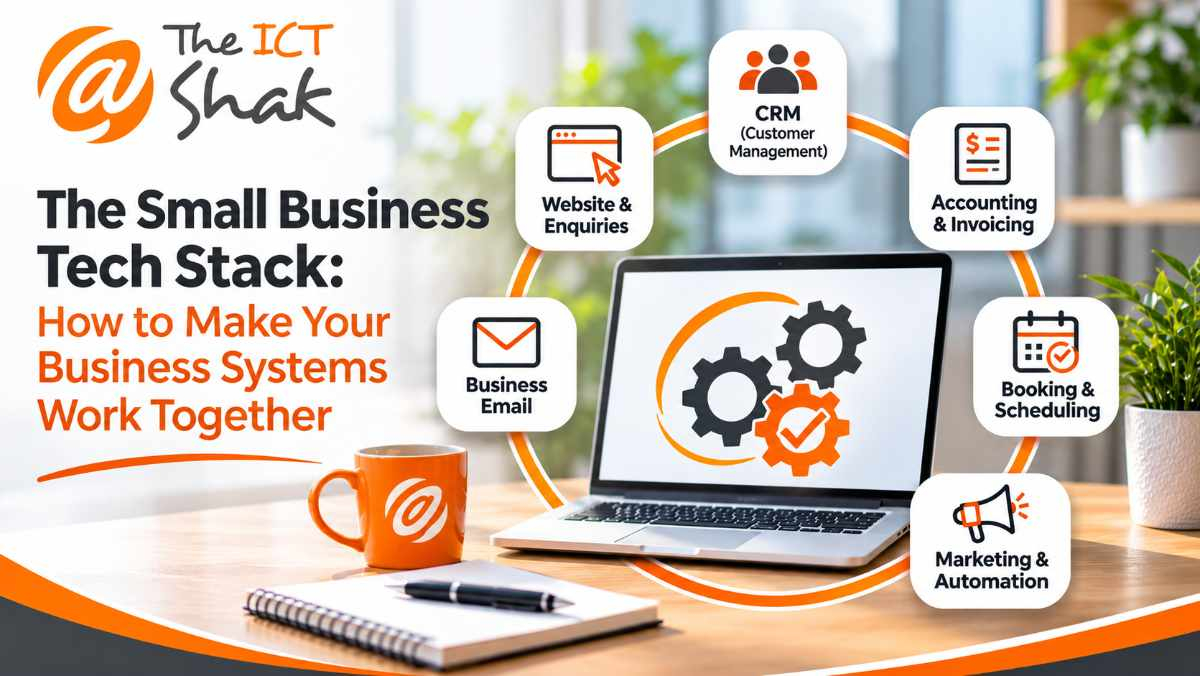
For a small business, this might include:
- Your website and online presence
- Business email and communication tools
- Customer Relationship Management (CRM) software
- Accounting and invoicing systems
- Online booking and appointment scheduling
- Marketing and automation tools
The important question is not how many systems you have, but how effectively they support your business.
Six essential parts of a small business tech stack
1. Your website: The foundation of your digital presence
Your website is often the first place a potential customer learns about your business. It should do more than simply look attractive.
It should explain what you offer, build trust and make it easy for visitors to take the next step.
2. Business email and communication
Professional email helps establish credibility and provides a reliable way to communicate with customers.
Ideally, your communication tools should also help you keep track of conversations and enquiries.
3. Customer Relationship Management (CRM)
A CRM helps you organise customer information, track enquiries and manage follow-ups.
Rather than relying on memory, spreadsheets or scattered emails, you can see where each potential customer is in their journey.
4. Accounting and invoicing
Accounting software helps manage invoices, payments, expenses and financial records.
When connected to other systems, it can reduce double handling and make administration easier.
5. Booking and scheduling
Online booking tools allow customers to arrange appointments without repeated phone calls or emails.
For service businesses, this can save considerable time and improve the customer experience.
6. Marketing and automation
Marketing tools can help manage email campaigns, follow-ups, customer reminders and other routine communications.
Automation works best when it supports a well-designed business process rather than adding unnecessary complexity.
The real value comes from connecting your systems
Imagine a potential customer visits your website and completes an enquiry form.
In a disconnected business, the enquiry might arrive in an inbox, where someone must manually record the details, remember to respond and follow up later.
In a connected business, that same enquiry could automatically enter your CRM, trigger an acknowledgement, notify the appropriate person and create a follow-up task.
The customer receives a more consistent experience, and your business spends less time on administration.
Five questions to ask before purchasing another software subscription
Before adding another tool, consider:
- What business problem are we trying to solve?
- Do we already have software that can do this?
- Will the new system integrate with our existing tools?
- Who will manage and maintain it?
- Will it genuinely save time or improve the customer experience?
A system that looks inexpensive on its own can become costly if it requires extra subscriptions, manual work or ongoing troubleshooting.
Attract, Capture, Convert and Retain
At The ICT Shak, we look at business technology as part of the complete customer journey.
1 - Attract
Help potential customers discover your business.
2 - Capture
Turn interest into enquiries and contacts.
3 - Convert
Follow up and turn enquiries into customers.
4 - Retain
Build ongoing relationships and repeat business.
Your website, CRM, marketing tools and business processes should support these stages together.
Your technology should grow with your business
A business with one or two employees has different needs from a business with fifteen staff members.
Start with the essentials. Add systems when there is a clear business need, and review existing tools regularly.
Sometimes replacing several disconnected subscriptions with one integrated solution can simplify operations. In other cases, connecting the systems you already use is the better choice.
When should you review your tech stack?
It may be time for a review if your team regularly enters the same information into multiple systems, customer enquiries are being missed, or you are paying for software that nobody uses.
You might also find that your business has outgrown systems that worked perfectly well when you first started.
Making your business technology work for you
Technology should make running your business easier, not more complicated.
At The ICT Shak, we help small businesses understand their digital systems, identify gaps and find practical ways to connect their website, marketing and customer management tools.
Whether you are starting from scratch or trying to make existing systems work better together, the goal is the same: technology that supports your business rather than creating more work.
Ready to make your business systems work better together?
Contact The ICT Shak to discuss your website, CRM and digital business systems.