WordPress is one of the most popular platforms for building business websites. One of its biggest advantages is the flexibility it offers, allowing businesses to create professional websites and manage their own content.
However, not all WordPress websites are built in the same way.
Some use the standard WordPress block editor, known as Gutenberg, while others rely on third-party page builders such as Elementor, Divi or WPBakery.
These page builders can make it easier to create complex layouts without extensive coding knowledge. However, they can also introduce additional costs, software dependencies and ongoing maintenance requirements.
For business owners, the question is not simply which page builder creates the best-looking website.
It is also about how easy that website will be to maintain, update and manage in the years ahead.
What is a WordPress page builder?
A WordPress page builder is a tool that allows website pages to be created using visual elements rather than writing all the underlying code.
For example, instead of manually coding a page layout, you can add headings, images, buttons, columns, contact forms and other elements through an editing interface.
Some of the most commonly used WordPress page builders include:
- Elementor: A popular visual drag-and-drop builder with both free and premium versions.
- Divi: A commercial WordPress theme and visual builder system developed by Elegant Themes.
- WPBakery: A long-established page builder frequently found on older WordPress websites.
- Beaver Builder: Another visual page builder offering free and premium options.
- Gutenberg: The native WordPress block editor, included as part of WordPress itself.
Each takes a different approach to building and managing website content.
While all can be used to create professional websites, the differences become particularly important when the website needs updating, redesigning or transferring to another provider.
The hidden cost of WordPress page builder licences
One issue businesses can encounter is discovering that their website relies on a premium page builder, but they do not have access to a valid licence.
This can happen when a website was originally built using a developer's agency licence, a premium product was included with a theme, or the licence was never transferred to the business owner.
Sometimes the licence has simply expired.
The business owner may not even realise their website depends on paid software.
What happens when a page builder licence expires?
An expired licence does not necessarily mean the website will immediately stop working.
However, depending on the product and licence terms, it may affect access to:
- Premium software updates.
- Technical support.
- New features and compatibility improvements.
- Premium templates and design libraries.
- Certain integrations or online services.
The biggest concern is often ongoing maintenance.
WordPress, PHP, themes and plugins are regularly updated. If a premium page builder cannot receive updates, compatibility problems may develop over time.
Outdated software can also become a security concern, particularly if known vulnerabilities are not addressed.
A website should not depend on software that nobody is responsible for maintaining.
Who owns your Elementor or Divi licence?
Having administrator access to your WordPress website does not necessarily mean you control all the software used to build it.
For example, an Elementor Pro licence may belong to the original developer, or a Divi licence may be associated with an agency account.
There is nothing inherently wrong with an agency supplying software through its own licence, provided the arrangement is properly managed and clearly explained.
However, business owners should understand:
- Whether the licence belongs to them or their website provider.
- Whether licence renewals are included in a maintenance agreement.
- What happens if they change website providers.
- Whether they will continue receiving updates and support.
- Whether any additional annual fees will apply.
These details should be discussed when a website is built and included in the handover information.
Without that understanding, a business can discover unexpected costs or technical limitations years later.
Can Elementor, Divi and other page builders slow down a website?
They can, depending on how they are used.
Some third-party page builders generate additional HTML, CSS and JavaScript to support their visual layouts, animations and interactive features.
A website that relies heavily on these features, along with multiple add-ons and plugins, may require more resources to load.
This can affect:
- Website loading speed.
- Mobile performance.
- Responsiveness.
- The amount of code browsers need to process.
- Ongoing maintenance and troubleshooting.
However, it is important to understand that using Elementor or Divi does not automatically make a website slow.
A well-developed Elementor website can perform better than a poorly built Gutenberg website.
Hosting quality, image optimisation, caching, theme development and plugin selection all play a significant role.
The goal should be to achieve the required design and functionality without introducing unnecessary complexity.
Elementor vs Divi vs Gutenberg: What is the difference?
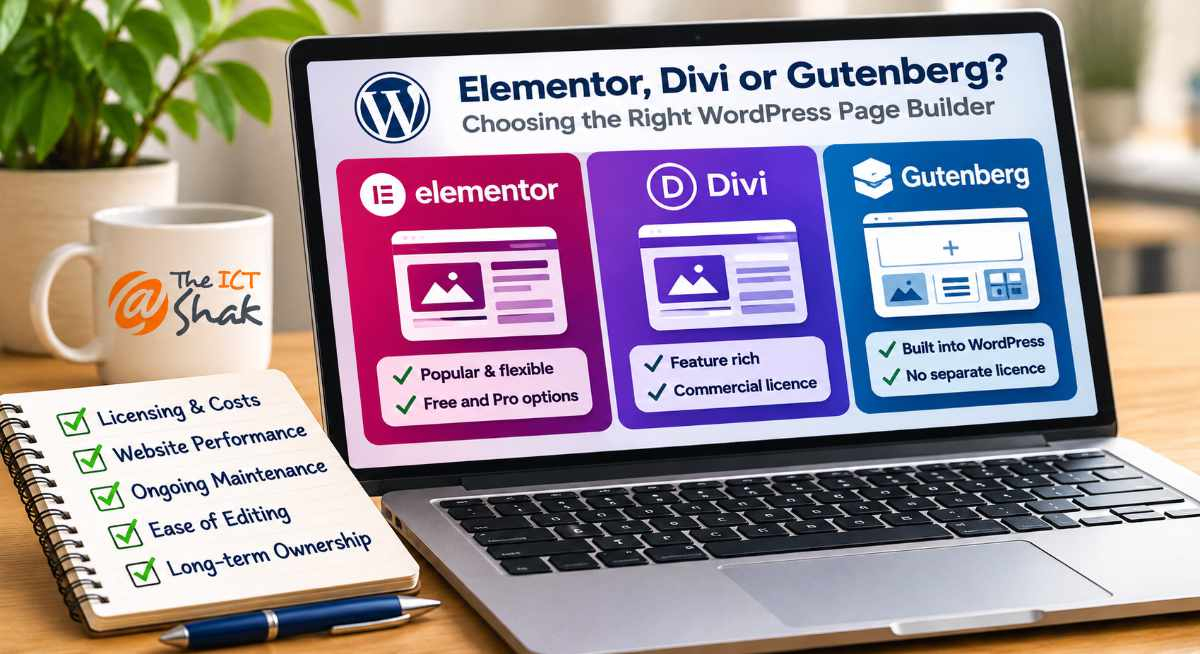
Elementor, Divi and Gutenberg are three common approaches to creating WordPress website layouts.
Although they can achieve similar visual results, their licensing and development approaches differ.
| Feature | Elementor | Divi | Gutenberg |
|---|---|---|---|
| Type | Third-party page builder | Commercial theme and visual builder system | Native WordPress block editor |
| Licence | Free version; paid Pro features | Paid commercial licence | Included with WordPress |
| Editing | Visual drag-and-drop | Visual drag-and-drop | Block-based editing |
| Additional software | Elementor and optional add-ons | Divi theme or builder and optional add-ons | Theme and selected plugins |
| Performance | Depends on implementation | Depends on implementation | Can support lightweight development |
| Changing builders | Layout rebuilding may be required | Layout rebuilding may be required | Uses native WordPress blocks |
| Ongoing maintenance | Separate builder updates | Separate theme/builder updates | Updated with WordPress core |
Is Elementor a good choice for WordPress?
Elementor is popular because it provides a flexible visual editing experience.
Its free version supports many common design requirements, while Elementor Pro adds advanced features such as additional widgets, templates and theme-building functionality.
For some websites, Elementor is a suitable choice.
However, businesses should understand which features depend on Elementor Pro and whether they will need an ongoing paid licence.
They should also consider how easily the website can be maintained if they change developers or decide to move away from Elementor in the future.
What about Divi?
Divi is another widely used WordPress website-building system.
Developed by Elegant Themes, it combines extensive design capabilities with a visual editing interface.
Divi is a commercial product, so businesses need to understand its licensing arrangements and ongoing update requirements.
A website built extensively with Divi may also depend on its layout system for page structure and styling.
Moving away from Divi can involve rebuilding layouts, reviewing content and replacing functionality that relies on the builder.
This does not mean Divi is unsuitable. It simply means businesses should understand the long-term implications before committing to it.
What about WPBakery?
WPBakery is particularly common on older WordPress websites.
It has been used extensively with commercial WordPress themes, sometimes bundled as part of the original theme package.
Some WPBakery implementations rely heavily on shortcodes to create page layouts.
If the builder is removed, those shortcodes may remain within the content or the original layouts may no longer display correctly.
Older websites can also contain additional customisations and plugins that make upgrading or replacing the builder more complicated.
This is one reason a website that appears relatively simple on the front end can be surprisingly difficult to maintain behind the scenes.
What is Gutenberg, the WordPress block editor?
Gutenberg is the block editor built into WordPress.
Rather than requiring a separate page builder, it allows content to be created using blocks.
These include:
- Headings and paragraphs.
- Images and galleries.
- Columns and groups.
- Buttons and calls to action.
- Lists and tables.
- Video and embedded content.
- Reusable patterns and layouts.
Developers can extend Gutenberg using custom blocks, suitable plugins, theme styles and CSS.
This makes it possible to create professional, customised websites without necessarily relying on a separate commercial page builder.
Gutenberg itself does not require a paid licence, although some optional third-party blocks, themes and extensions may have premium versions.
Why we generally recommend Gutenberg for WordPress websites
At The ICT Shak, our preferred approach for new WordPress websites is to use the native Gutenberg block editor, supported by a well-developed theme, appropriate CSS and carefully selected plugins where needed.
There are several reasons for this.
1. Fewer third-party dependencies
Using Gutenberg reduces the need for a separate page builder to manage the website's core content and layouts.
This can simplify ongoing maintenance and reduce reliance on additional premium software.
2. Greater control over the website
A well-developed WordPress theme, combined with Gutenberg and CSS, provides considerable flexibility.
The website can be designed around the needs of the business without relying entirely on a particular page builder's templates or layout system.
3. Simpler content editing
When a website is developed with a clear block structure, business owners can often update text, images and other content without navigating a complicated visual editing interface.
This is particularly valuable for businesses that want to manage their own content.
4. Potential performance benefits
Gutenberg can support lightweight website development by reducing the need for additional page-builder scripts and styling.
However, performance still depends on the overall quality of the website, including hosting, theme development, images and plugins.
5. Easier long-term maintenance
Because Gutenberg is part of WordPress, it develops alongside the core platform.
This reduces dependence on a separate page builder's licensing arrangements and development cycle.
It does not remove the need for maintenance, but it can help keep the website's underlying technology simpler.
Can you switch from Elementor or Divi to Gutenberg?
Yes, but it is not always a simple process.
Websites built extensively with Elementor, Divi or WPBakery often rely on those builders to display their layouts.
Simply deactivating the page builder may result in missing styling, broken layouts or content that no longer displays as intended.
The exact outcome depends on how the builder stores and renders its content.
For example:
- Elementor stores layout information using its own structure and settings.
- Divi websites may rely on builder-specific layout data and modules.
- WPBakery implementations can contain shortcodes that remain in the content when the builder is removed.
Moving to Gutenberg may require rebuilding individual pages, recreating design elements and reviewing existing functionality.
For older websites, it may be more practical to undertake a structured redesign rather than attempting to replace the page builder while preserving every part of the original implementation.
However, the decision should be based on the condition of the website, its requirements and the costs involved.
Does every Elementor or Divi website need to be rebuilt?
No.
There are many websites using Elementor, Divi and other page builders that work perfectly well.
If a website is performing properly, the software is licensed and maintained, and the business can manage its content comfortably, there may be no immediate reason to change.
A rebuild becomes worth considering when the underlying technology is creating ongoing problems.
For example:
- Important plugins or page builders are outdated.
- Premium licences have expired or cannot be accessed.
- WordPress or PHP upgrades cause compatibility problems.
- The website is slow or performs poorly on mobile devices.
- Simple content changes are unnecessarily difficult.
- The website relies on numerous outdated plugins or customisations.
- Maintenance is becoming increasingly expensive.
- The business wants a more flexible website for future growth.
The aim should be to choose the most practical and sustainable solution rather than rebuilding simply because a particular page builder is being used.
Questions to ask before having a WordPress website built
If you are planning a new website or considering a redesign, ask your developer these questions before committing.
1. Which page builder or editor will be used?
Find out whether the website will use Gutenberg, Elementor, Divi or another system.
2. Will I need to pay for any software licences?
Ask about ongoing licence fees and whether they are included in your maintenance agreement.
3. Who controls the licences?
Understand whether the licences belong to your business or your developer.
4. Can I update the website myself?
Ask to see how common content changes will be made.
5. What happens if I change website providers?
Make sure you understand whether any licences, functionality or support arrangements will be affected.
6. How will the website be maintained?
Find out who is responsible for keeping WordPress, the theme and plugins updated.
7. Can the website be redesigned without starting from scratch?
Understand how dependent the content and layouts are on the chosen page builder.
These questions can help avoid unexpected costs and complications later.
Frequently asked questions about WordPress page builders
Is Gutenberg better than Elementor?
Neither is automatically better for every website.
Elementor offers an extensive visual design interface, while Gutenberg is built into WordPress and can reduce reliance on third-party page-builder software.
For many small business websites, Gutenberg provides the flexibility needed without introducing an additional premium page-builder dependency.
Does Divi slow down WordPress websites?
Divi can add resources to support its design features, but this does not mean every Divi website is slow.
Performance depends on the website's design, configuration, hosting, images and optimisation.
What happens if an Elementor Pro licence expires?
An expired Elementor Pro licence does not generally cause existing website pages to disappear immediately.
However, access to premium updates, support and certain services may be affected.
This can create maintenance and compatibility concerns over time.
Can I move my website from Divi to Gutenberg?
Yes, but pages built using Divi may need to be rebuilt or adjusted to work with Gutenberg.
The amount of work depends on how extensively Divi was used and the complexity of the existing website.
Is Gutenberg free?
Yes. Gutenberg is included with WordPress and does not require a separate page-builder licence.
Some optional third-party blocks, plugins and themes may have paid features.
Is WPBakery still suitable for a WordPress website?
WPBakery can continue to be used on properly maintained and compatible websites.
However, older implementations should be reviewed to ensure the software is supported, updated and compatible with the current WordPress and PHP environment.
Can I remove Elementor without losing my website content?
Removing Elementor does not necessarily delete the underlying content, but pages built with it may lose their layouts, styling or builder-specific functionality.
A proper review and migration plan is recommended before removing an existing page builder.
Build your WordPress website for the long term
A business website is an investment, and the technology behind it matters just as much as its appearance.
Elementor, Divi and other page builders can be useful tools, but businesses should understand their licensing requirements, maintenance needs and potential limitations.
For many small business websites, Gutenberg provides the flexibility required to create a professional website without introducing unnecessary dependencies.
At The ICT Shak, we generally recommend Gutenberg, supported by a well-developed theme and appropriate CSS, because it allows us to build websites that are practical to manage, maintain and develop over time.
If your existing WordPress website relies on an older page builder, has missing licences or is becoming increasingly difficult to maintain, it may be worth reviewing the technology behind it.
A good website should not only look professional today. It should also be practical to maintain tomorrow.