Want a simple way to get more eyes on your business?
Google Posts are a great (and free!) way to share updates, promotions, and events right on your Google Business Profile — where customers are already searching for you.
Here’s a step-by-step guide to creating Google Posts that keep your business active and visible in local search results.
Step-by-Step Guide: How to Create a Google Post
Step 1: Log into Your Google Business Profile
Head to the Google Business Profile Manager and log in with your Google account.
Screenshot Suggestion #1:
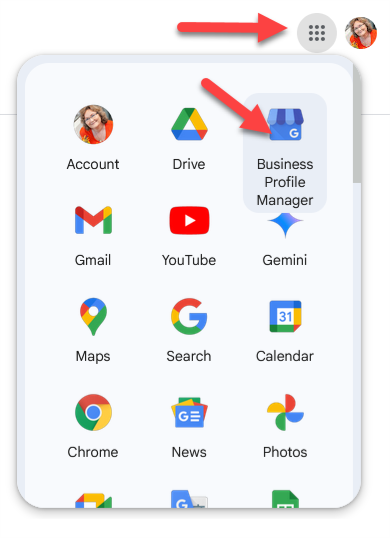
Caption: “Log into your Google Business Profile to get started.”
Step 2: Select ‘Posts’ from the Menu
Once inside your dashboard, click on the ‘Add Update’ section in the side menu (or main dashboard).
Screenshot Suggestion #2:

Caption: “Click on the ‘Posts’ section to manage your updates.”
Step 3: Click ‘Add Update’
Click the button labelled ‘Add Update’ to create a new post.

Step 4: Choose a Post Type
You’ll be prompted to select the type of post you want to create:
- Update – Share news or general updates.
- Offer – Promote a sale or limited-time deal.
- Event – Share details about an upcoming event.
Screenshot Suggestion #4:

Caption: “Choose the post type that best suits your message.”
Step 5: Write Your Post, Add a Photo, & Include a Call to Action
Craft a short, clear message. You can also:
- Add a photo or video
- Include a button (call to action) such as Call Now, Learn More, Book Online, or Get Offer
Screenshot Suggestion #5:

Caption: “Write your post, add an image, and select a call-to-action button.”
Step 6: Click ‘Publish’
Once your post looks good, click ‘Publish’ to make it live.
Posts usually appear in your listing within minutes.
Pro Tip:
Post regularly — weekly if possible — to keep your business visible and active on Google.
Why Use Google Posts?
Google Posts help you connect with customers directly in search results.
✔️ Stay Top of Mind:
Your posts appear right on your business listing when customers search for your business.
✔️ Share Timely Updates:
Easily promote events, special offers, news, or seasonal messages.
✔️ Drive More Actions:
Posts can include direct calls-to-action like Call Now or Visit Website.
Need Help?
At The ICT Shak, we love helping local businesses get noticed online.
If you’d prefer, we can manage your Google Posts and local SEO for you — saving you time while improving your results.
Want your listing to stand out? Contact us here to chat.