

Did you know businesses with high-quality photos on their Google Business Profile get more views, more clicks, and more enquiries?
Adding fresh, vibrant images not only makes your listing more attractive but also builds trust with potential customers.
Here’s a simple, step-by-step guide to help you upload great photos to your Google Business Profile.
Step-by-Step Guide: Upload Photos to Your Google Business Profile
Step 1: Log into Your Google Business Profile
Visit the Google Business Profile Manager and log into your account.
Screenshot Suggestion #1:

Caption: “Log into your Google Business Profile to get started.”
Step 2: Click on ‘Photos’
Once inside your dashboard, find and click the ‘Photos’ tab.
Screenshot Suggestion #2:
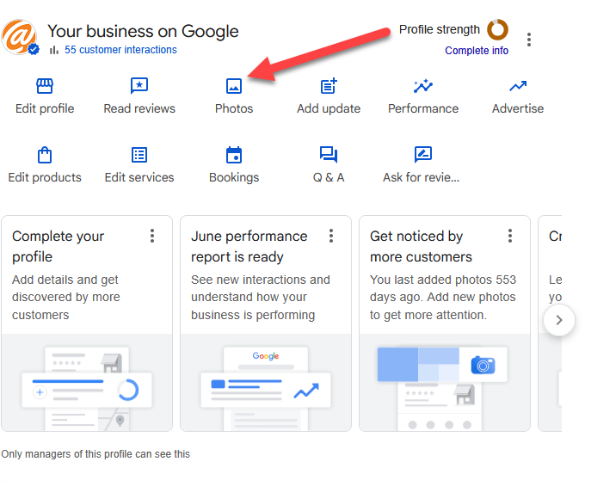
Caption: “Navigate to the 'Photos' section in your dashboard.”
Step 3: Choose a Photo Category
Select the appropriate category for your images:
- Interior: Show off your workspace or shop interior.
- Exterior: Help customers recognise your business from the outside.
- Products: Showcase your products or services.
- Team: Introduce your team and highlight friendly faces.
Screenshot Suggestion #3:
Screenshot showing the different photo categories (Interior, Exterior, Products, Team).
Caption: “Choose the right category to organise your photos.”
Step 4: Upload Bright, Clear Images
Click the ‘+’ or ‘Add Photos’ button and upload your images.
Make sure your photos:
- Are high-resolution (not blurry or pixelated)
- Have good lighting
- Accurately represent your business
Screenshot Suggestion #4:
Screenshot showing the photo upload screen with images being selected.
Caption: “Upload bright, clear photos that reflect your business.”
Step 5: Add Descriptions (If Available)
Where possible, add descriptions or captions to your photos. This provides more context and can also help with search visibility.
Pro Tip:
Photos showing your business in action — like serving customers or creating products — often perform best! Natural lighting works wonders.
Why Great Photos Matter on Google Business
Adding quality photos isn’t just about looking good — it can directly improve your business performance.
✔️ Higher Engagement
Businesses with photos get more clicks and calls through Google.
✔️ Increased Trust
Photos help potential customers feel confident that you’re a professional, trustworthy business.
✔️ Improved Search Visibility
Google favours businesses that regularly update their profiles — including adding new photos.
Need Help with Your Profile?
At The ICT Shak, we’re always happy to provide DIY tips — but if you’d prefer to have it done professionally, we can help with:
- Photo uploads
- Profile optimisation
- Full local SEO services
Let’s chat! If you want your Google listing to work harder for you, contact us here.